Conversion Funnel Analysis
Analyze conversion funnels online from Excel or CSV data. Measure drop-off, stage conversion, and bottlenecks with AI.
Or try with a sample dataset:
Preview
What Is Conversion Funnel Analysis?
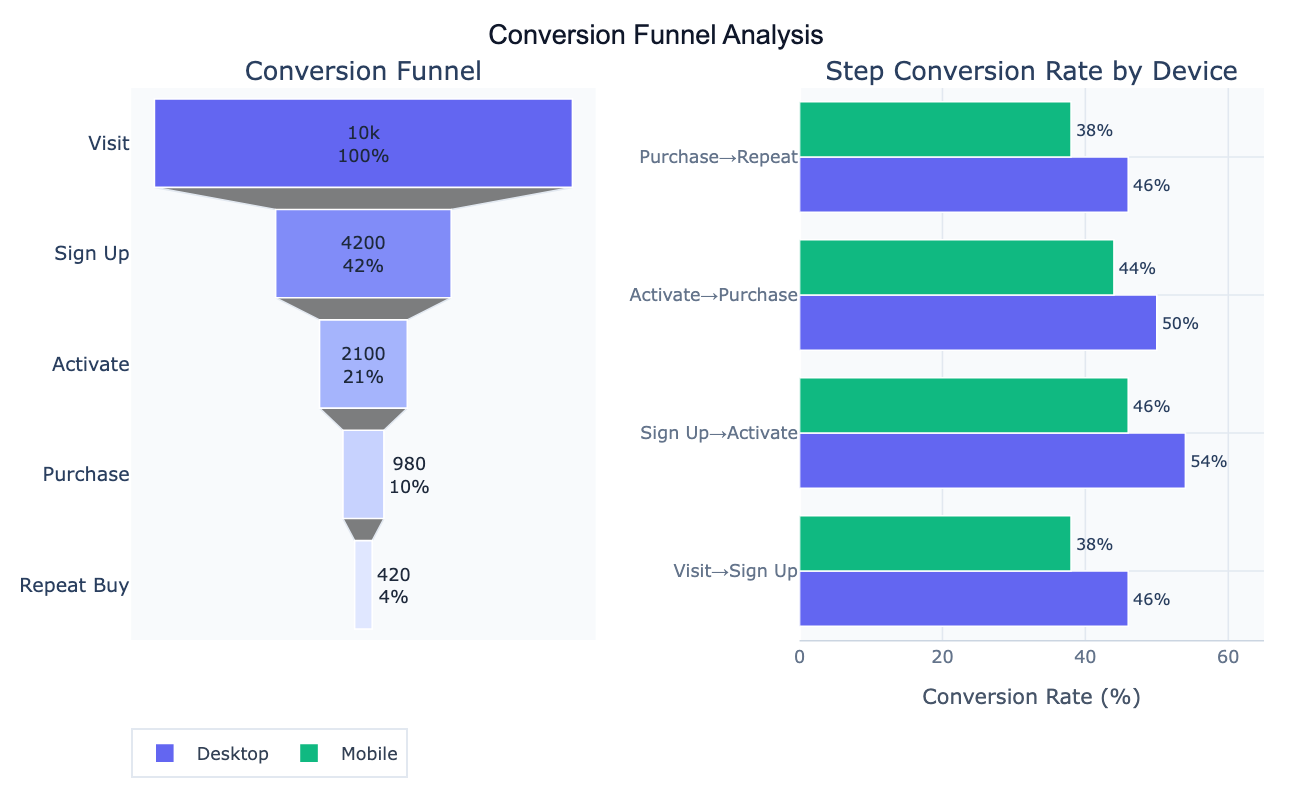
Conversion funnel analysis maps the sequential journey that users, customers, or participants take through a defined series of stages — from an initial entry point to a final desired outcome — and quantifies how many people pass through each stage versus drop out. The "funnel" metaphor reflects the shape of the data: a large population enters at the top, and progressively fewer reach each subsequent stage. The critical outputs are step-to-step conversion rates (what fraction of people who reached stage N also completed stage N+1) and cumulative conversion rate (what fraction of the initial population ultimately reached the final stage). Together these pinpoint exactly where the largest losses occur and by how much.
The distinction between absolute drop-off and relative drop-off matters for prioritization. A stage where 3,000 users out of 12,000 drop out represents a 25% relative loss and 3,000 absolute users lost — this may be the highest-priority bottleneck even if the step conversion rate (75%) sounds acceptable. A later stage where 200 users out of 400 drop out has a worse relative rate (50%) but smaller absolute impact. Segment comparison — running the same funnel analysis for different user groups (mobile vs. desktop, new vs. returning users, different acquisition channels) — often reveals that a funnel problem is concentrated in one specific segment, making it far more actionable than the aggregate view suggests.
A concrete example: an e-commerce funnel tracks 12,480 site visitors through five stages: Visit → View Product → Add to Cart → Start Checkout → Purchase. The aggregate purchase conversion is 6.9% (862 buyers). The cart-to-checkout step has a 53% conversion rate — the worst in the funnel — suggesting a checkout entry barrier (complex form, required account creation). The device comparison reveals the cart-to-checkout rate is only 48% on mobile but 57% on desktop, pinpointing the mobile checkout experience as the primary optimization target. Fixing the mobile checkout flow could recover an estimated 180 additional purchases per 12,000 visitors.
How It Works
- Upload your data — provide a CSV or Excel file with either individual-level event data (one row per user per event, with
user_id,stage, andtimestampcolumns) or an aggregate summary table (one row per stage with stage name and count). - Describe the funnel — e.g. "5-stage funnel: Visit, View, Cart, Checkout, Purchase; compute step-to-step and overall conversion rates; funnel chart; compare mobile vs desktop"
- Get full results — the AI writes Python code using pandas and Plotly to compute conversion rates, build the funnel chart, and produce segment comparison bar charts
Required Data Format
Option 1 — Individual event log (one row per user-stage combination):
| Column | Description | Example |
|---|---|---|
user_id | Unique user identifier | U1234 |
stage | Funnel stage reached | cart, checkout |
segment | Optional: grouping variable | mobile, desktop |
timestamp | Optional: event time | 2024-03-15 14:32:00 |
Option 2 — Aggregate summary (one row per stage):
| Column | Description | Example |
|---|---|---|
stage | Stage name (in order) | Visit, View, Cart |
count | Number reaching this stage | 12480, 7240 |
segment | Optional: grouping variable | mobile, desktop |
For event logs, each user should appear once per stage they completed — duplicate rows indicate multiple events and should be deduplicated. Describe the stage order in your prompt so the AI sequences them correctly.
Interpreting the Results
| Output | What it means |
|---|---|
| Stage count | Number of users who reached each stage |
| Step conversion rate | % of users from the previous stage who completed this stage |
| Cumulative conversion rate | % of all users who entered the funnel and reached this stage |
| Absolute drop-off | Number of users lost at each step — prioritize the steps with the most users lost |
| Relative drop-off | % of users at the stage who did not proceed — identifies process bottlenecks |
| Funnel chart | Stacked horizontal bars or trapezoid funnel visualization showing volume at each stage |
| Segment comparison | Step conversion rates broken out by segment — reveals which group drives the bottleneck |
| Time-to-convert | For timestamped data: median time between stages — identifies slow or abandoned journeys |
Example Prompts
| Scenario | What to type |
|---|---|
| Basic funnel | 5 stages in order (Visit, View, Cart, Checkout, Purchase); step conversion rates; cumulative conversion; funnel chart |
| Aggregate input | I have summary counts: Visit=12480, View=7240, Cart=3610, Checkout=1920, Purchase=862; funnel chart with drop-off annotations |
| Segment comparison | compare funnel conversion rates for mobile vs desktop; grouped bar chart by segment; which step has the largest mobile gap? |
| Bottleneck analysis | identify the stage with (1) largest absolute drop-off and (2) worst step conversion rate; estimate revenue impact of improving it by 10% |
| Time-based funnel | compute time-to-convert at each step; median and 75th percentile; which stage has the longest delays? |
| Cohort funnel | funnel by acquisition week; compare conversion rates for users acquired in Jan vs Feb vs March; line plot of cumulative conversion by cohort |
| Multi-path funnel | users can take different paths; compute the most common sequences and their conversion rates; Sankey diagram of user flows |
| Funnel over time | monthly funnel conversion rates for the last 12 months; line chart of step conversion rates over time; identify months with drops |
Assumptions to Check
- Stage ordering — the stages must represent a sequential process where completion of stage N is required before stage N+1; if users can skip stages or complete them in any order, a standard funnel model misrepresents the process and a user flow / Sankey approach is more appropriate
- User deduplication — each user should appear only once per stage; if the data is an event log with multiple events per stage per user, deduplicate before computing conversion rates; duplicate events inflate stage counts and distort conversion rates
- Attribution of drop-off — funnel analysis shows where users drop off but not why; a low cart-to-checkout conversion could be caused by price shock at checkout, a broken button, or users completing the purchase on a different device; combine funnel data with qualitative feedback, session recordings, or error logs to diagnose root causes
- Segment independence — when comparing funnels across segments, ensure the segments are defined by pre-funnel characteristics (device at first visit, acquisition channel) rather than behavior within the funnel; defining segments mid-funnel (e.g., "users who added to cart") introduces selection bias
- Time window — define a consistent observation window (e.g., 30-day window from first visit to final conversion); without a window, later-stage conversions from older cohorts mix with recent entries, producing misleading conversion rates that depend on the funnel's age
Related Tools
Use the A/B Test Calculator to test whether a change to a specific funnel step (e.g., a new checkout flow) significantly improves the step conversion rate — funnel analysis identifies the bottleneck and A/B testing validates the fix. Use the AI Sankey Diagram Generator when users can take multiple paths through the funnel rather than following a single sequence — Sankey diagrams visualize multi-path user flows with volumes on each path. Use the Survival Curve Generator when the outcome of interest is time-to-conversion rather than whether conversion happened — survival analysis handles censored observations (users who haven't converted yet) correctly. Use the Chi-Square Test Calculator to formally test whether conversion rate differences between segments are statistically significant rather than due to chance sampling.
Frequently Asked Questions
Should I use step-to-step conversion rates or overall conversion rates? Report both, but use them for different purposes. Step-to-step rates (the fraction of users at stage N who proceed to stage N+1) identify the worst-performing individual transitions and are the right input for optimization efforts — improving step 3's rate from 48% to 55% adds a specific number of users. Overall (cumulative) rates (the fraction of all entrants who reach a given stage) show the compounding impact of step improvements and are more useful for high-level business reporting ("6.9% of visitors become buyers"). A common mistake is focusing only on the step with the lowest percentage conversion when the step with a slightly better rate but much higher absolute traffic may yield more improvement from optimization.
How do I handle users who convert on a second session or days later? Define a conversion window — the maximum time between first funnel entry and final conversion that counts as a complete journey. A 7-day, 30-day, or 90-day window is typical depending on the purchase cycle. Users who do not complete the funnel within the window are counted as drop-offs at their last stage. This requires timestamped event data. Without a conversion window, long-lag converters (users who entered months ago and eventually bought) artificially inflate conversion rates for recent cohorts that haven't had enough time to convert — a phenomenon called right-censoring that makes recent conversion rates appear worse than historical ones.
What is the difference between a funnel and a Sankey diagram? A funnel assumes a linear, ordered process — users can only move forward through predefined stages and are counted by the furthest stage they reached. This is appropriate when there is one canonical path (Visit → Cart → Purchase). A Sankey diagram visualizes all observed paths simultaneously, showing how users flow between states, including loops, skips, and exits at any point. Sankey diagrams are appropriate when users take multiple routes (e.g., some users go directly from homepage to checkout skipping the product page, or some return to browsing after starting checkout). For most e-commerce and marketing funnels with a defined intended path, the funnel chart is simpler and more actionable; use Sankey when understanding path diversity is the goal.