Two-Way ANOVA Calculator for Excel & CSV
Run two-way ANOVA online from Excel or CSV data. Test main effects, interactions, and group comparisons with AI.
Or try with a sample dataset:
Preview
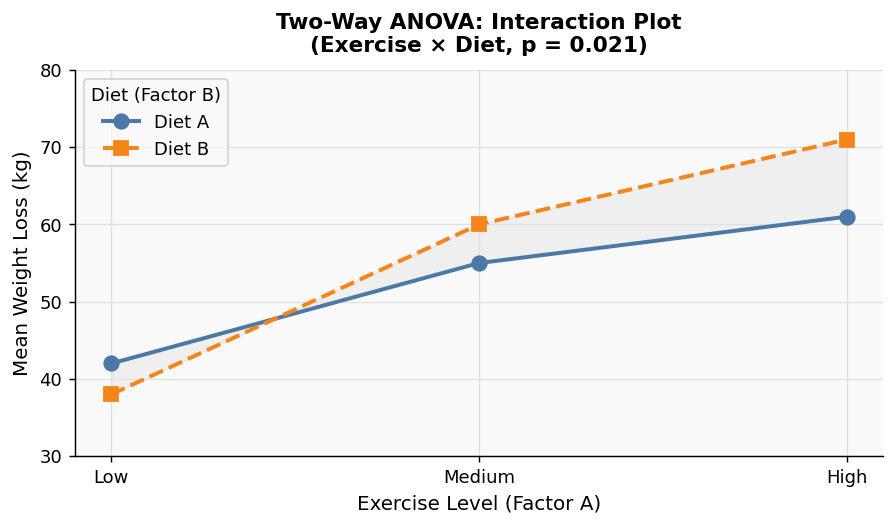
What Is Two-Way ANOVA?
Two-way ANOVA tests the effect of two independent variables on a continuous outcome — and crucially, whether those two factors interact with each other.
Use two-way ANOVA when you have:
- Two categorical independent variables (factors), each with 2+ levels
- One continuous dependent variable
- Independent observations (for repeated-measures, ask the AI to run a mixed-model instead)
Example: Does plant growth depend on fertilizer type, watering frequency, and whether those two factors work differently in combination?
How It Works
- Upload your data — CSV or Excel with columns for each factor and the outcome
- Describe your factors — e.g. "two-way ANOVA: outcome is yield, factors are fertilizer and irrigation"
- Get full results — main effects, interaction effect, F-statistics, p-values, and marginal means
The AI generates Python code using Pingouin or statsmodels.
Interpreting the Results
| Output | What it means |
|---|---|
| Main effect (Factor A) | Does Factor A affect the outcome, averaged across all levels of Factor B? |
| Main effect (Factor B) | Does Factor B affect the outcome, averaged across all levels of Factor A? |
| Interaction (A × B) | Does the effect of Factor A depend on which level of Factor B is present? |
| p-value | p < 0.05 indicates the effect is statistically significant |
| Marginal means | Group means for each combination of factor levels |
Always check the interaction first. If the interaction is significant, the main effects cannot be interpreted on their own — you need to look at each factor-level combination separately.
Example Prompts
| Scenario | What to type |
|---|---|
| Drug and dosage experiment | two-way ANOVA: outcome is pain_score, factors are drug_type and dosage |
| Marketing test | compare conversion_rate by ad_format and audience_segment |
| Education study | effect of teaching_method and class_size on test_score |
One-Way vs. Two-Way ANOVA
| One-Way ANOVA | Two-Way ANOVA | |
|---|---|---|
| Independent variables | 1 | 2 |
| Detects interactions | No | Yes |
| Use when | Comparing groups on a single factor | Testing two factors and their combined effect |
Use the one-way ANOVA calculator when you only have one grouping variable.
Assumptions to Check
- Normality — residuals should be approximately normally distributed
- Homogeneity of variance — variance should be similar across all groups (Levene's test is included)
- Independence — each observation comes from a different subject
- Balanced design — equal (or near-equal) sample sizes per cell improve power and robustness
Frequently Asked Questions
What is an interaction effect? An interaction means the effect of one factor changes depending on the level of the other. For example, a new teaching method might improve scores in small classes but not large ones — that's an interaction between method and class size.
What if my interaction is significant? Run post-hoc tests (e.g. Tukey HSD) on the individual cell means to identify which specific combinations differ. Ask the AI to add these automatically.
Can I use two-way ANOVA with unequal group sizes? Yes, but use Type III sums of squares (the default in this tool), which correctly handles unbalanced designs.
My data has repeated measures — does this tool work? Standard two-way ANOVA assumes independence. If the same subjects appear in multiple conditions, ask the AI to run a repeated-measures ANOVA or mixed ANOVA instead.